
SOAP to REST Gateway
Expose Legacy SOAP Web Services as REST APIs
The Membrane API Gateway can expose legacy SOAP Web Services as modern REST APIs within minutes. It automatically converts WSDL to OpenAPI and transforms requests and responses between JSON and XML. No programming is required.
The SOAP to REST converter generates an OpenAPI description directly from the WSDL document. To map reliably between JSON and XML, Membrane uses the static type information from the WSDL and its XML Schemas.
How It Works
The diagram illustrates how Membrane exposes an existing SOAP Web Service as a REST API.
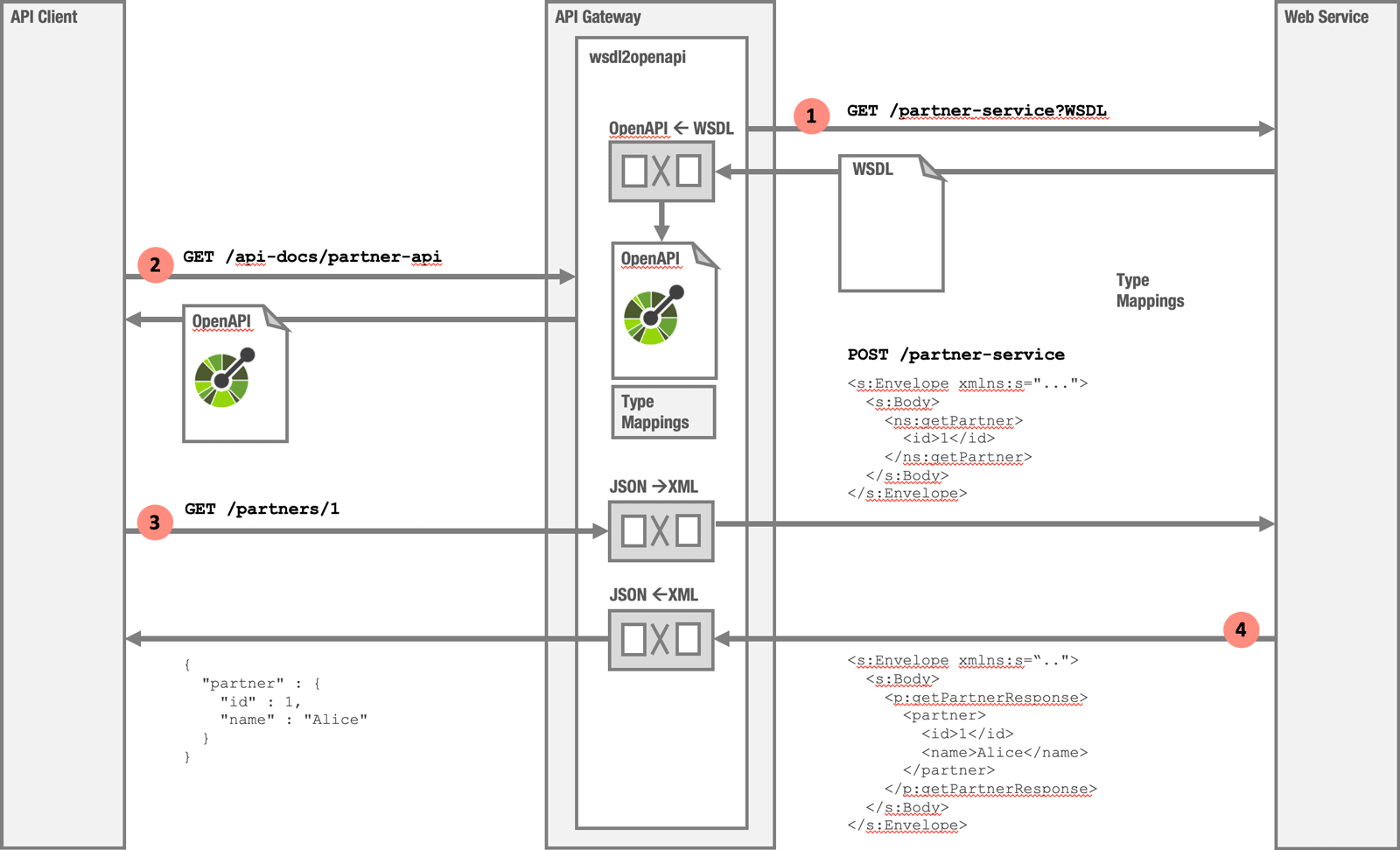
- Convert WSDL to OpenAPI
On startup, Membrane reads the WSDL and generates an OpenAPI together with the mappings required for the transformation between JSON and XML. - Expose the OpenAPI description
API clients and development tools can retrieve the generated OpenAPI description. - Transform REST and JSON to SOAP
An incoming REST API call is transformed into the XML required by the SOAP Web Service. HTTP method and path are mapped to match the corresponding Web Service operation. - Transform SOAP and XML to JSON
The XML response from the Web Service is transformed into JSON and returned to the client.
Configuration
A WSDL is a precise description of a Web Service, including its operations and data types. Membrane uses this information to automatically configure most of the SOAP-to-REST conversion. As a result, the basic configuration is simple:
api:
  port: 2000
  name: Partner API
  flow:
    - wsdl2openapi:
        wsdl: partner.wsdl
Generate OpenAPI from WSDL
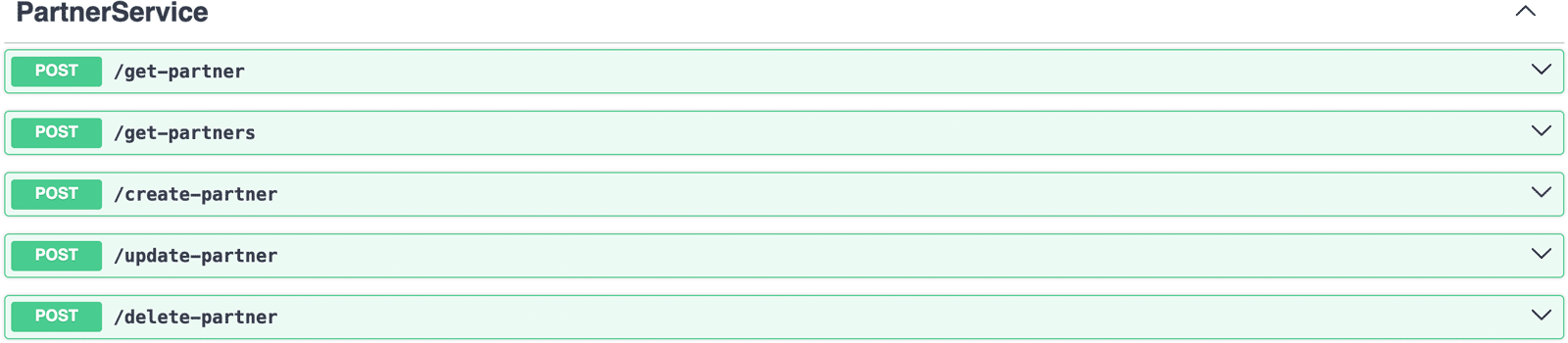
This configuration is already a fully working SOAP-to-REST converter. Membrane reads the WSDL, generates an OpenAPI description, and provides an interactive Swagger UI. The generated API documentation is available at:
http://localhost:2000/api-docs/ui/partner-api-v1-0-0No manually written OpenAPI document is required. The API description is derived from the operations and data types defined in the WSDL.
Map SOAP Operations to REST Resources
The generated interface is RPC style: the operation getPartner becomes POST /get-partner. By adding methods and a URI template per operation, the exposed interface can be adapted to comply with the REST principles.
api:
  port: 2000
  name: Partner REST API
  flow:
    - wsdl2openapi:
        wsdl: partner.wsdl
        operations:
          getPartners:
            method: GET
            path: /partners
          getPartner:
            method: GET
            path: /partners/{id}
          createPartner:
            path: /partners
            method: POST
          updatePartner:
            method: PUT
            path: /partners/{id}
          deletePartner:
            method: DELETE
            path: /partners/{id}
Here, the SOAP operation updatePartner is exposed as the REST endpoint:
PUT /partners/{id}.By mapping WSDL operations to HTTP methods and resource paths, the generated interface can follow REST principles while the underlying SOAP Web Service remains unchanged.
JSON to SOAP and XML Conversion
A REST client can now call the API using JSON. For example, a client creating a new partner might send:
POST /partners HTTP/1.1
Content-Type: application/json

{
  "name": "Dave",
  "birthDate": "1990-01-01",
  "address": {
    "street": "5 Oak Ave",
    "postalCode": "54321",
    "city": "Portland"
  }
}
Membrane uses the type information obtained from the WSDL and its XML Schemas to convert the JSON payload into the XML structure expected by the Web Service. It then wraps the XML in a WSDL-compliant SOAP message:
<s11:Envelope xmlns:s11="http://schemas.xmlsoap.org/soap/envelope/">
  <s11:Body>
    <ns:createPartnerRequest xmlns:ns="http://example.com/partner">
      <name>Dave</name>
      <birthDate>1990-01-01</birthDate>
      <address>
        <street>5 Oak Ave</street>
        <postalCode>54321</postalCode>
        <city>Portland</city>
      </address>
    </ns:createPartnerRequest>
  </s11:Body>
</s11:Envelope>
Next Steps
- Getting started with the Membrane API Gateway
- SOAP and WSDL legacy integration — routing, WSDL rewriting and XML validation
- REST GET to SOAP conversion for read-only services