
WSDL Explained: How to Read a WSDL – Beginner’s Guide
WSDL documents describe the contract of SOAP-based Web Services. They are a central component for service integration, management, and governance. Many tools, such as client and server code generators, rely on WSDL. For us humans, however, WSDL is complex and difficult to read.
This article builds a tree diagram from a WSDL document to illustrate its structure. After reading it, you'll understand how WSDL works.
As an example, we use the WSDL of a bank routing service. To follow along, print the WSDL or open it in a text editor.
We begin with the root element of the WSDL document, which is named definitions. We do not analyze the child elements in document order, but from bottom to top. This makes it easier to follow references within the WSDL document.

At the end of the WSDL, we find the last child element of definitions named service.
<wsdl:service name="BLZService">
    <wsdl:port name="BLZServiceSOAP11port_http" binding="tns:BLZServiceSOAP11Binding">
        <soap:address location="http://www.thomas-bayer.com:80/axis2/services/BLZService"/>
    </wsdl:port>
    <wsdl:port name="BLZServiceSOAP12port_http" binding="tns:BLZServiceSOAP12Binding">
        <soap12:address location="http://www.thomas-bayer.com:80/axis2/services/BLZService"/>
    </wsdl:port>
    <wsdl:port name="BLZServiceHttpport" binding="tns:BLZServiceHttpBinding">
        <http:address location="http://www.thomas-bayer.com:80/axis2/services/BLZService"/>
    </wsdl:port>
</wsdl:service>
The name of the service is BLZService. A service can have multiple ports, indicated by a star in the figure below. Each port describes one way to access the service. In our example, there are three ports: one for SOAP 1.1, one for SOAP 1.2, and one for the HTTP binding.
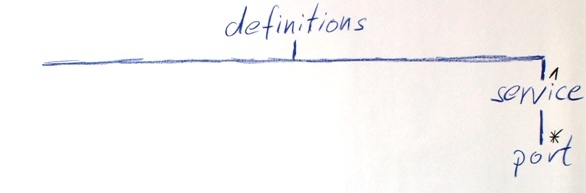
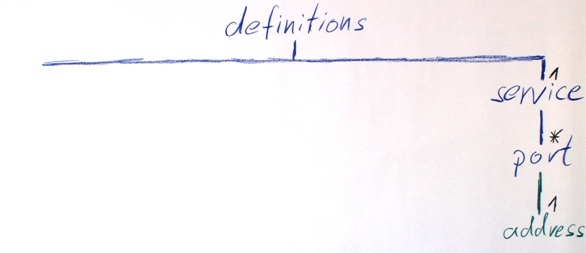
Let’s take a closer look at the first port.
<wsdl:port name="BLZServiceSOAP11port_http" binding="tns:BLZServiceSOAP11Binding">
    <soap:address location="http://www.thomas-bayer.com:80/axis2/services/BLZService"/>
</wsdl:port>
Its child element address uses a different XML prefix than the other elements. The prefix soap is bound to the SOAP 1.1 binding defined in this document. Instead of a SOAP binding, other bindings can also be used, for example for JMS messages or file access. The address element has an attribute named location that points to a service endpoint address where the service is reachable by HTTP.
Next, we look at the port’s binding attribute. The value tns:BLZServiceSOAP11Binding references a binding defined earlier in the document. In this example, each port points to a different binding. Therefore, the BLZService WSDL contains three bindings.
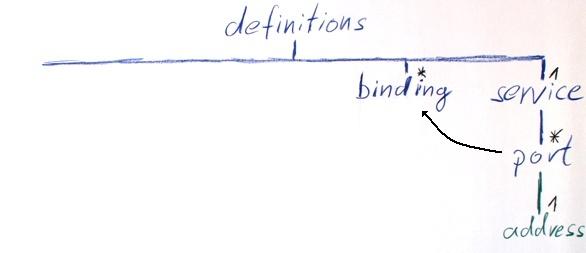
A binding provides details about a specific transport and has two different types of child elements.
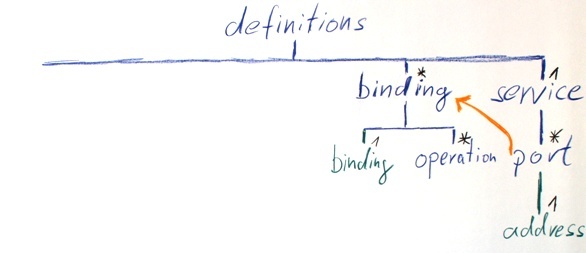
First, we take a look at the soap:binding element in the listing below. The value of the transport attribute is a URI that specifies that SOAP messages are transmitted over HTTP. The value document of the style attribute, together with the use attribute from the soap:body elements, indicates the message style. In our example, a Document/Literal message style is used.
A binding can specify different transport options for each individual service method.
<wsdl:binding name="BLZServiceSOAP11Binding" type="tns:BLZServicePortType">
    <soap:binding transport="http://schemas.xmlsoap.org/soap/http" style="document"/>
    <wsdl:operation name="getBank">
        <soap:operation soapAction="" style="document"/>
        <wsdl:input>
            <soap:body use="literal"/>
        </wsdl:input>
        <wsdl:output>
            <soap:body use="literal"/>
        </wsdl:output>
    </wsdl:operation>
</wsdl:binding>
Now look at the wsdl:operation inside the binding. There you will find the transport options for the getBank method. Inside the wsdl:operation element, line 2 contains a soap:operation element that defines details of the SOAP protocol and its transport. The soapAction is a leftover from earlier days. The Basic Profile of the Web Services Interoperability Organization recommends that soapAction should be set to an empty string.
<wsdl:operation name="getBank">
    <soap:operation soapAction="" style="document"/>
    <wsdl:input>
        <soap:body use="literal"/>
    </wsdl:input>
    <wsdl:output>
        <soap:body use="literal"/>
    </wsdl:output>
</wsdl:operation>
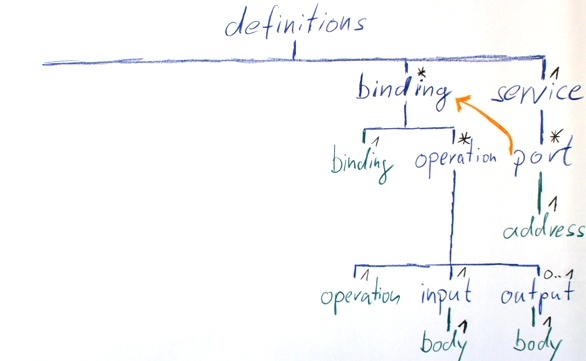
Since Web Services focus on messages rather than parameters, information about how these messages are transported can be found in the wsdl:input and wsdl:output elements. A service can also specify one or more fault elements as output for error messages.
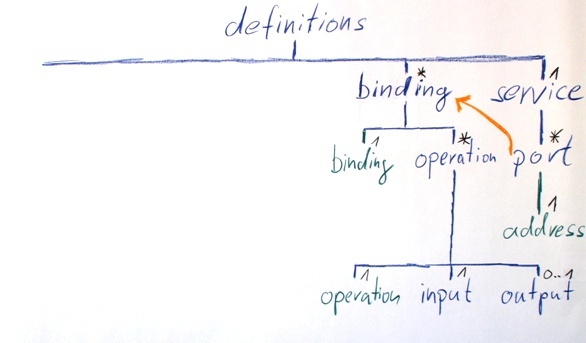
The soap:body and soap:header elements can describe additional characteristics of a message. In this example, the message style literal is used throughout.
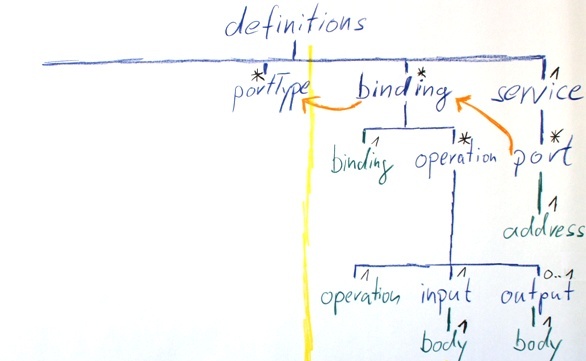
Let’s move further up in the WSDL. Next, we follow the value of the type attribute of the binding. It references a portType.
<wsdl:binding name="BLZServiceSOAP11Binding" type="tns:BLZServicePortType">We have now crossed the boundary between the concrete transport details like service location, and the abstract interface description. In WSDL 1.1, portType corresponds to the interface of a Web Service. In WSDL 2.0, the term portType was replaced by interface.
An interface can contain multiple operations. An operation corresponds to a function in procedural programming.
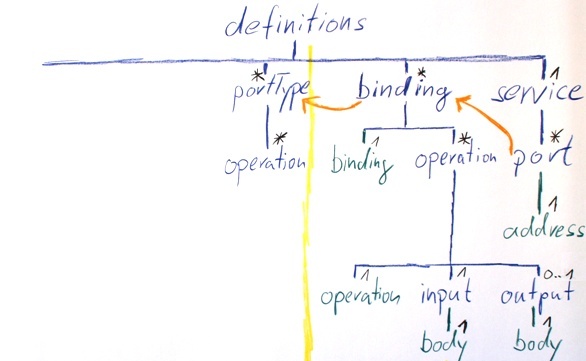
Within a portType, we find operation elements, just as in the binding. This time, however, input and output describe the structure of the messages rather than transport-specific options.
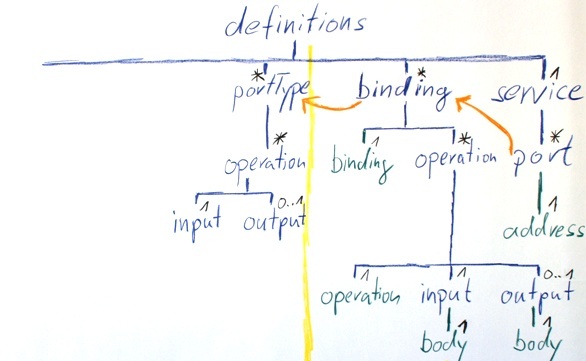
The message attribute of the input again references a section further up in the WSDL document, namely a message named tns:getBank.
<wsdl:portType name="BLZServicePortType">
    <wsdl:operation name="getBank">
        <wsdl:input message="tns:getBank"/>
        <wsdl:output message="tns:getBankResponse" wsaw:Action="http://thomas-bayer.com/blz/BLZService/getBankResponse"/>
    </wsdl:operation>
</wsdl:portType>
Above, we find the corresponding message with this name.
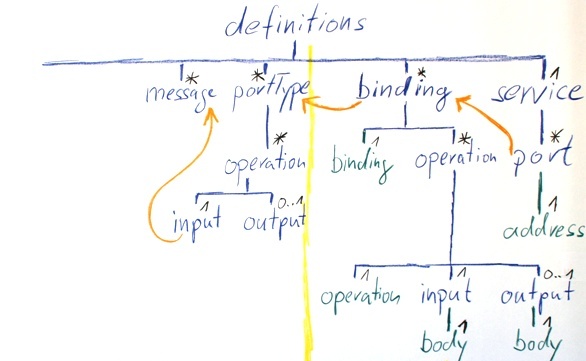
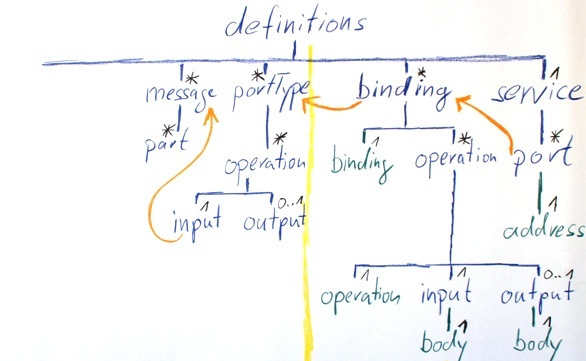
The getBank message has a part element as its child. A WSDL expert will recognize from the name attribute with the value parameters that this is the wrapped substyle of the Document/Literal style.
<wsdl:message name="getBank">
    <wsdl:part name="parameters" element="tns:getBank"/>
</wsdl:message>
The element attribute in line 2 again points further up. It references the tns:getBank element, which is defined in the XML schema.
The next child of definitions is types. The types element can contain multiple XML schemas as children.
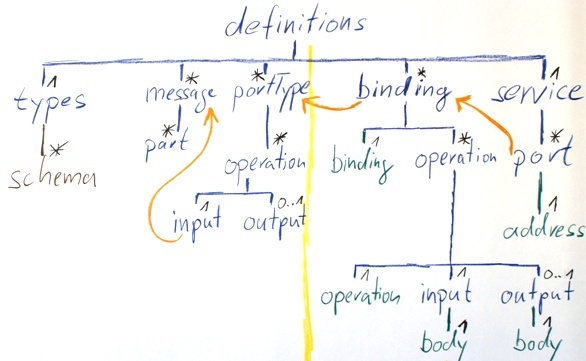
The listing shows the types element with an embedded schema.
<wsdl:types>
    <xsd:schema attributeFormDefault="unqualified" elementFormDefault="qualified" targetNamespace="http://thomas-bayer.com/blz/">
        <xsd:element name="getBank" type="tns:getBankType"/>
        <xsd:element name="getBankResponse" type="tns:getBankResponseType"/>
        <xsd:complexType name="getBankType">
            <xsd:sequence>
               <xsd:element name="blz" type="xsd:string"/>
            </xsd:sequence>
        </xsd:complexType>
        <xsd:complexType name="getBankResponseType">
            <xsd:sequence>
                <xsd:element name="details" type="tns:detailsType"/>
            </xsd:sequence>
        </xsd:complexType>
        <xsd:complexType name="detailsType">
            <xsd:sequence>
                <xsd:element minOccurs="0" name="bezeichnung" type="xsd:string"/>
                <xsd:element minOccurs="0" name="bic" type="xsd:string"/>
                <xsd:element minOccurs="0" name="ort" type="xsd:string"/>
                <xsd:element minOccurs="0" name="plz" type="xsd:string"/>
            </xsd:sequence>
        </xsd:complexType>
    </xsd:schema>
</wsdl:types>
The XML schema in the BLZService is a typical Web Services schema that only contains complexTypes and elements as top-level schema components.
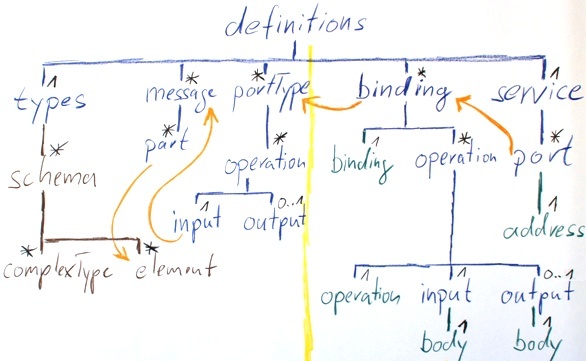
This is the declaration of the getBank element.
<xsd:element name="getBank" type="tns:getBankType"/>This element has the type getBankType that is defined elsewhere in the schema.
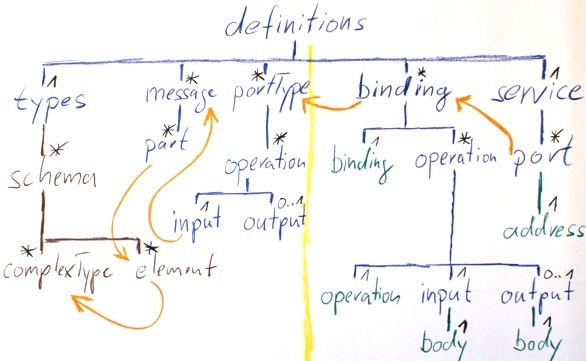
getBankType has a sequence as its model group, which contains an element named blz of the built-in schema type string.
<xsd:complexType name="getBankType">
    <xsd:sequence>
        <xsd:element name="blz" type="xsd:string"/>
    </xsd:sequence>
</xsd:complexType>
Let's add this to the diagram as well.
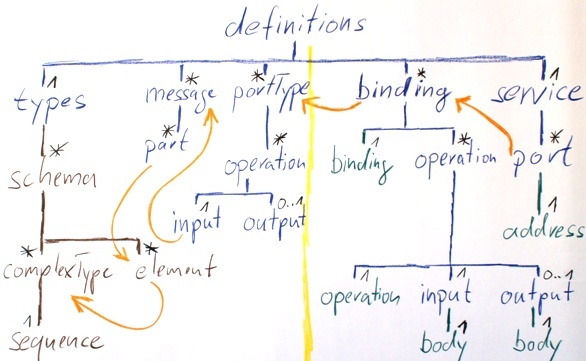
A sequence can consist of multiple elements that define the order of elements in a SOAP message.
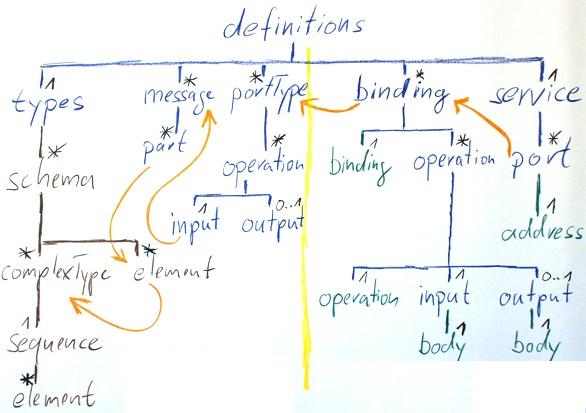
Now we have examined the complete WSDL description of the example service together.
All WSDL documents follow the same structure as the BLZService. To understand a WSDL, start reading at the end of the document and work your way upward by following the references in the attributes.
I hope this article has made it easier to get started with WSDL.
Thomas Bayer
bayer@predic8.com