
Legacy Integration with API Gateways: SOAP & WSDL
SOAP and WSDL have long passed their expiration date. Although these technologies have fallen out of favor, they remain widely used and often need to be integrated with modern APIs.
This text explores how to integrate those legacy services into a modern API gateway. But first let’s have a look at the gateways from SOA days.
Early API Gateways
The first generation of API gateways was built on Service-Oriented Architecture (SOA) tools, featuring excellent support for web services and XML. However, these gateways often required gigabytes of memory and were eventually replaced by more lightweight, modern solutions.
Modern API Gateways
Modern gateways, often implemented in Go, Rust or C++, have a much smaller footprint than their SOA predecessors. Although these platforms typically offer strong JSON and YAML support, they usually lack robust XML validation or WSDL capabilities. Nonetheless, as long as legacy protocols like SOAP or WSDL are transmitted over HTTP, API gateways can route them. Even if they don’t inherently understand XML, SOAP, or WSDL. Beyond simple routing, they offer no additional legacy-specific support.
Legacy Support in Membrane API Gateway
The open source Membrane API Gateway is built on the Java platform and provides the libraries and tools required for legacy SOA support. As a result, a Membrane instance uses about 200 MB of memory, while still maintaining a reasonable footprint. The following examples demonstrate plugins that enable seamless integration with legacy services.
Deploying a Web Service from WSDL
Membrane’s soapProxy makes it easy to deploy a Web Service on the gateway. The configuration automatically reads details such as the endpoint address, path, and XML Schema definitions from the WSDL:
soapProxy:
  port: 2000
  wsdl: https://www.predic8.de/city-service?wsdl
soapProxy: port: 2000 wsdl: https://www.predic8.de/city-service?wsdl
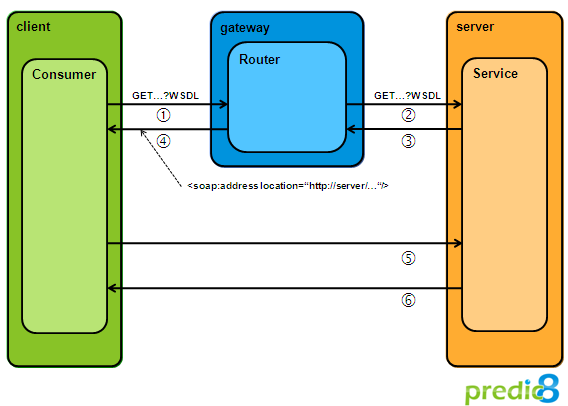
The WSDL retrieved from the gateway is rewritten to route traffic through the gateway, with the service location now pointing to the gateway.
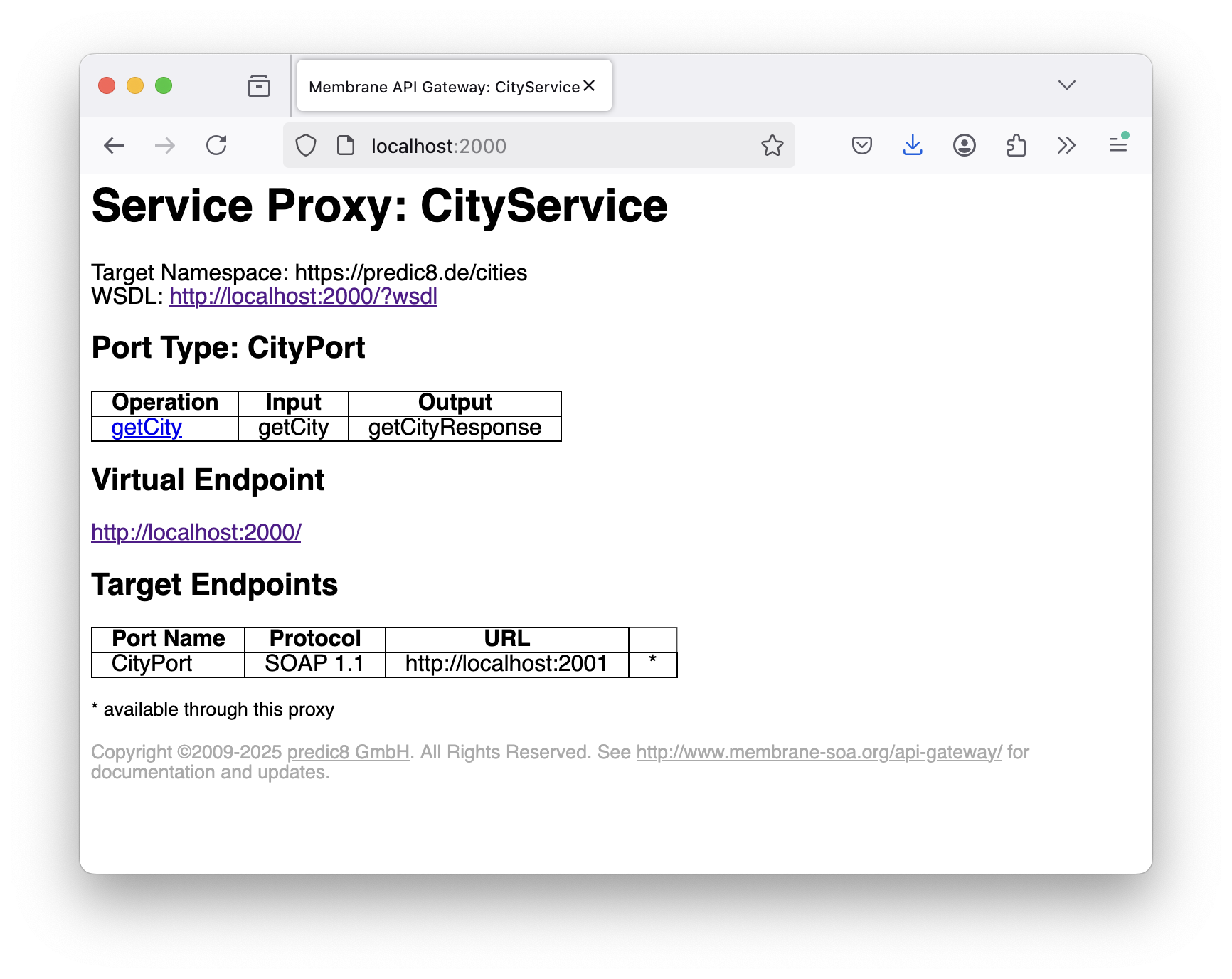
Additionally, the soapProxy validates input and output messages against the XSD schema definitions in the WSDL, and the web services explorer below simplifies the testing and exploration of deployed web services.
Mocking a Web Service with SOAP Body Template
Membrane API Gateway simplifies creating SOAP responses by providing a convenient soapBody plugin:
api:
    port: 2000
    path:
        uri: /service-mock
    flow:
        - response:
        - soapBody:
            version: '1.1'
            pretty: true
            src: |
                <getCityResponse xmlns="https://predic8.de/cities">
                    <country>England</country>
                    <population>8980000</population>
                </getCityResponse>
        - return:
            status: 200
api:
    port: 2000
    path:
        uri: /service-mock
    flow:
        - response:
        - soapBody:
            version: '1.1'
            pretty: true
            src: |
                <getCityResponse xmlns="https://predic8.de/cities">
                    <country>England</country>
                    <population>8980000</population>
                </getCityResponse>
        - return:
            status: 200
With soapBody, you only need to specify the payload. The gateway automatically wraps it in a SOAP envelope and body, applying the correct namespaces—allowing you to focus on the essential SOAP content rather than the surrounding boilerplate.
Exposing SOAP Web Services as REST APIs
Legacy SOAP services are likely to persist. But you might not want to connect to them using SOAP. Instead, you can expose them as REST APIs. The following example demonstrates how to convert a SOAP service into a REST API endpoint:
api:
  port: 2000
  method: GET
  path:
    uri: /cities/{city}
  flow:
    - request:
        - soapBody:
            src: |
              <getCity xmlns="https://predic8.de/cities">
                  <name>${pathParam.city}</name>
              </getCity>
        - setHeader:
            name: SOAPAction
            value: https://predic8.de/cities/get
    - response:
        - template:
            contentType: application/json
            src: |
              {
                "country": ${xpath('//country')},
                "population": ${xpath('//population')}
              }
  target:
    # Change method to POST
    method: POST
    url: https://www.predic8.de/city-service
api:
  port: 2000
  method: GET
  path:
    uri: /cities/{city}
  flow:
    - request:
        - soapBody:
            src: |
              <getCity xmlns="https://predic8.de/cities">
                  <name>${pathParam.city}</name>
              </getCity>
        - setHeader:
            name: SOAPAction
            value: https://predic8.de/cities/get
    - response:
        - template:
            contentType: application/json
            src: |
              {
                "country": ${xpath('//country')},
                "population": ${xpath('//population')}
              }
  target:
    # Change method to POST
    method: POST
    url: https://www.predic8.de/city-service
XPath Support
In practice, the small details are often the most helpful. Through the gateway, Membrane offers not only JsonPath but also XPath as an expression language. You can leverage many plugins with XPath that read values from XML documents, allowing you to integrate modern API gateway features such as rate limiting or API keys with legacy XML-based web services.
- setProperty:
          name: population
          value: ${//population}
          language: xpath
      - setProperty:
          name: population
          value: ${//population}
          language: xpath
Summary
The Membrane API Gateway, leveraging the Java platform, bridges this gap by offering comprehensive legacy support—including automatic WSDL deployment, SOAP body templating, and the ability to expose SOAP services as REST APIs.
Where to Start?
Have a look at the samples in the tutorials/soap folder of the distribution. Or read the chapters about Legacy Integration in the free API Gateway eBook.