JWT API Authentication with OAuth2 Client Credentials
This tutorial demonstrates how an API client can request a JSON Web Token with the OAuth2 Client Credentials flow and use it as a Bearer token for API authentication.
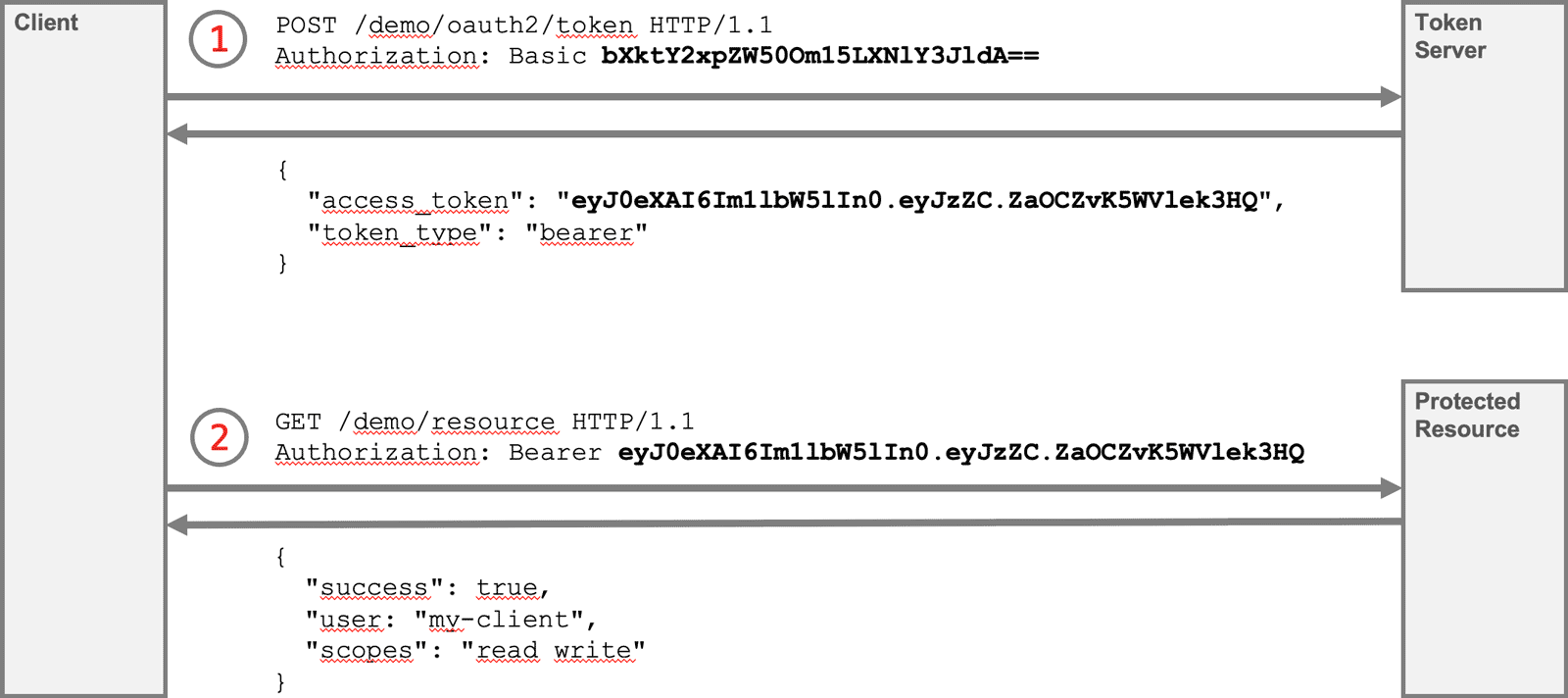
The token server and the protected resource are hosted at our server. To follow this tutorial, you only need curl.
Step 1: Requesting a JSON Web Token
Choose the command for your operating system and run it in a terminal:
Linux and macOS
curl -X POST https://api.predic8.de/demo/oauth2/token -v \
  -H "Content-Type: application/x-www-form-urlencoded" \
  -u "my-client:my-secret" \
  -d "grant_type=client_credentials"
Windows PowerShell
curl.exe -X POST https://api.predic8.de/demo/oauth2/token -v `
  -H "Content-Type: application/x-www-form-urlencoded" `
  -u "my-client:my-secret" `
  -d "grant_type=client_credentials"
The option -u sends the client ID and client secret with HTTP Basic Authentication.
You can use any client ID and client secret in this demo. The demo token endpoint accepts them and uses the client ID as the subject of the token.
The response contains the access token:
HTTP/1.1 200 OK
Content-Type: application/json

{
  "access_token": "eyJ0eXAiOiJKV1QiLCJhbGciOiJSUzI1NiIsImtpZCI6Im1lbWJyYW5lIn0.eyJzdWIiOiJhbGljZSIsImF1ZCI6ImRlbW8tcmVzb3VyY2UiLCJzY29wZXMiOiJyZWFkIHdyaXRlIiwiaWF0IjoxNzgxNzgzMzU4LCJleHAiOjE3ODE3ODM2NTgsIm5iZiI6MTc4MTc4MzIzOH0.GQWDQfmgYfJ7NXA5qps0Zvd2Cl7FKR-BrB5wu5fMK2vPtDpYskPUuMksHNL1XIujLQ54Bb3uHPHBq9tp2hhiuiwKqiDjF4aBQ8wwjGu7NkJOE5BReTN1l1m5FmEfqMOQZ1Lx2hsviXQSUsKbR0X3i4TM54L9vc4DA7G-2Gt_m44MGp3yhwrOxY7KCDghTlSW_j8laC-s7ecEHYUIdw55fN2P4Lf6Z8sekELgoYNLMnXDxukQ89hnLe8E1nspqe4w2jDUNeM_PxskyGsnB6XnYxFEa2DgPGGhXihPojnp-bt57gjUHHKe1B-UOxApy615TKNcajZaOCZvK5WVlek3HQ",
  "token_type": "bearer",
  "expires_in": 300
}
The value of the access_token field contains the JWT. A JWT consists of three parts:
eyJ0eXAiOiJKV1QiLCJhbGciOiJSUzI1NiIsImtpZCI6Im1lbWJyYW5lIn0.eyJzdWIiOiJtb21vIiw
YXVkIjoib3JkZXIiLCJzY29wZXMiOiJyZWFkIHdyaXRlIiwiaWF0IjoxNzgwNjYzOTg4LCJleHAiOjE
3ODA2NjQyODgsIm5iZiI6MTc4MDY2Mzg2OH0.Cz-jC57kuil9TQaR1FnYsUARYECqYeyJhA6ZjTDm20
KLyCUiYBmJBFkcEoX87nepjXlu_oIN-ha_MFfnRcjqQvi6KA95wqcZ4rfN7yaqDBsqtKRhVJMxLxnzb
x43O8DKaMTrK4qtwf7RanW7SI_eaiOg5RoITE__JHMs4HN4E65vLDyGWtUgSoD4fVAb6c5NIoYNsT4w
bUUtA6zCObgC9XT9rifYpk7T9tp3L3WxmP3Os306uUc7diNW20dwFi2CcPp9DDgmHEUdlFUcBEfzMa3
QfbBHZ7eCuLmg_KW4yViTi0rQs2vYdUQohc0rxgPD_yetyFxT_SLt3TpEW8g9dQ
An OAuth2 token server does not always return a JWT. OAuth2 allows different access token formats. In this tutorial, the token server returns a JWT so that you can inspect its contents.
The JWT is an encoded string that can be safely used in an HTTP header. The API can read the token claims and verify the signature before accepting the request.
Step 2: Analyze the JSON Web Token (Optional)
To see what is encoded in the token, open jwt.io and paste the value of access_token into the input field.
The decoded token looks similar to this:
{
  "typ": "JWT",
  "alg": "RS256",
  "kid": "membrane"
}
.
{
  "sub": "my-client",
  "aud": "demo-resource",
  "scopes": "read write",
  "iat": 1780663748,
  "exp": 1780664048,
  "nbf": 1780663628
}.
Binary signature
The first part is the JWT header. It describes the token type and the signing algorithm. In this example, the token is signed with RS256, an asymmetric algorithm that uses a private key for signing and a public key for verification.
The second part is the JWT payload. It contains claims about the client and the token.
sub is the subject. In this example, the subject is my-client, the client ID used to request the token.
aud is the audience. It defines the API this token is intended for. The API should only accept the token if the audience matches.
scopes describe what the client is allowed to do. This token has the scopes read and write.
The token also has time restrictions. exp defines when the token expires. nbf means not before and defines the earliest time when the token is valid. These values are UNIX timestamps.
In this example, the token is valid for 420 seconds. You get this value by subtracting nbf from exp.
The third part is the signature. The API uses it to verify that the token has not been changed.
Step 3: Call an API with the Token
Copy the value of access_token from the response in step 1 and use it in the Authorization header:
curl -H "Authorization: Bearer eyJ...Zd5FcQPXaH6w" https://api.predic8.de/demo/resourceIf the token is valid, the API returns information from the token:
{
  "client": "my-client",
  "scopes": "read write"
}
The API can use the client ID and the scopes for authorization decisions.
Hint: If you get an error, check whether the token has expired. Request a new token and try again.
Security Aspects
Why not send the client ID and client secret directly to the API? Wouldn't that be simpler?
It would be simpler, but it would also expose the client secret to every API. A client secret is powerful and should only be sent to the trusted token endpoint.
An access token is more limited than the client secret. It can be restricted by time, audience, and scopes. In this tutorial, the token can only be used for the demo resource and only for a few minutes.
This is especially useful when you have many APIs and one central OAuth2 token server. Clients authenticate once at the token server and then use short-lived access tokens for API calls.
Rule: Use the least privilege needed for each request.
In real applications, OAuth2 client libraries usually request, cache, and renew access tokens automatically. You do not need to implement the full token handling logic yourself.