
Sharing AI Accounts Without Sharing the API Keys
AI agents and coding assistants need access to LLM APIs. Access is usually provided through API keys. Giving every developer and tool its own provider account and API key is hard to manage, expensive, and risky. Distributing the same key within an organization creates even greater risks.
An LLM Gateway allows organizations to share access to a central LLM provider account without exposing the real provider API key to developers, tools, or local installations.
This page explains the risks of distributing LLM API keys and how organizations can securely share access to AI models using an LLM Gateway.
Proliferation of API Keys
Managing separate AI provider subscriptions and API keys for every developer, IDE, agent, and automation tool is impractical. Under time pressure, organizations often start sharing existing provider API keys across teams and systems.
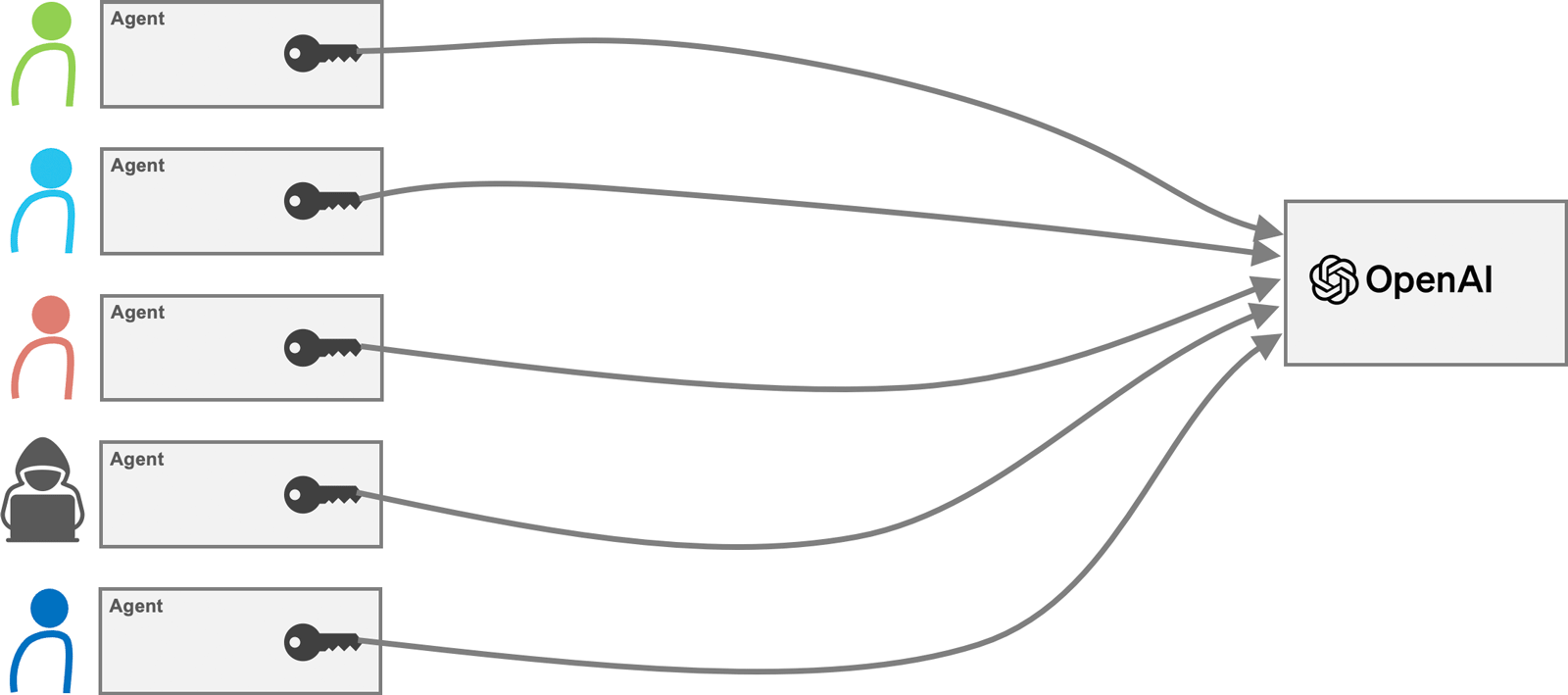
Over time, the same key spreads throughout the organization. It is copied into local IDE configurations, shell scripts, CI/CD systems, container environments, and agent installations. Eventually, nobody knows exactly where the key is used anymore.
This creates serious security and operational risks. If the key is leaked, abused, or exceeds usage limits, the only reliable response is to revoke it. But revoking the key can suddenly break systems that still depend on it, including applications nobody knows are still using that key.
Sharing AI Accounts Without Exposing the Providers API Key
With Membrane, developers and tools can use internal API keys issued by the organization. The gateway validates these keys and injects the real provider key for the AI provider before forwarding the request to the model.
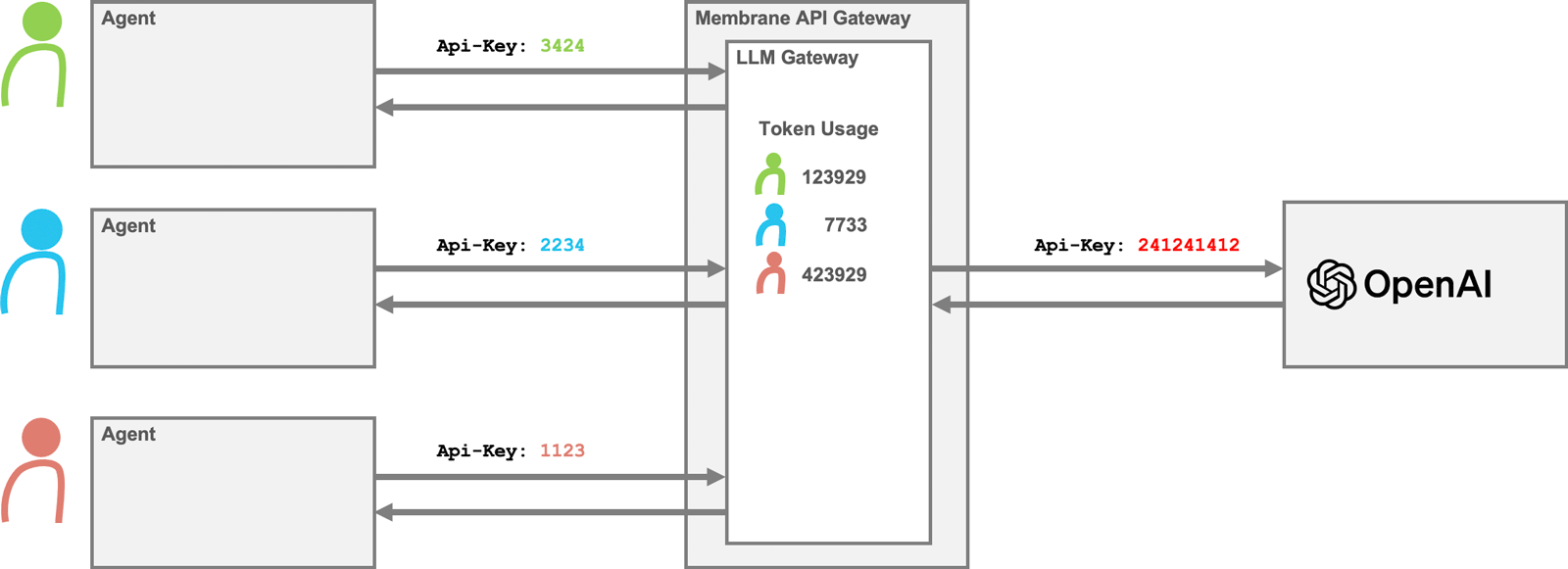
The benefits are:
- The real provider API key is not exposed to developers, IDEs, or agents.
- The company only needs one central provider account instead of many individual subscriptions.
- Usage can be tracked by the internal API key.
- Provider keys can be rotated without changing every client configuration.
Membrane Configuration for API Key Sharing
The following configuration exposes an OpenAI compatible LLM Gateway. Client applications send their requests to the gateway instead of directly to OpenAI.
Developers and tools authenticate with internal API keys defined in the users section.
The gateway validates the internal API key, enforces quotas, and forwards the request to the OpenAI API using the centrally managed provider key.
api:
  port: 2000
  flow:
    - llmGateway:
        apiKey: <<Replace with your API_KEY>>
        openai: {}
        simpleStore:
          # User-facing API keys for the LLM Gateway
          users:
            - name: alice
              apiKey: secret
              tokens: 100000 # Token limit
            - name: bob
              apiKey: changeme
              tokens: 50000
          limitResetPeriod: 3600
  target:
    url: https://api.openai.com/
Applications and tools can now use the gateway instead of connecting directly to OpenAI.
Easy Setup for Developers and Tools
Developers configure their IDEs, agents, or automation tools with the URL of the Membrane LLM Gateway and their internal API key. The tool can then use the AI provider through the gateway without knowing the real provider credentials.
The snippet of the config.toml file below shows how to set up codex to talk to the LLM Gateway instead of OpenAI directly.
model = "gpt-5-nano"
preferred_auth_method = "apikey"
model_provider = "llm-gateway"

[model_providers.llm-gateway]
name = "OpenAI over Membrane"
base_url = "http://localhost:2000/v1"
env_key = "AI_APIKEY"
wire_api = "responses"
Set the environment variable AI_APIKEY to the internal key of alice or bob.
Set Up API Key Sharing
Try it yourself. The setup takes less than 15 minutes.
- Download Membrane API Gateway.
- Explore the examples in the
tutorials/ai/llm-gatewayfolder. - Set up your configuration based on the sample.